
Purchase FAQs
You can download the trial version from our download page. It is fully functional and will allow you to try out all features. Without a license, it will display a license warning message. However you can simply ignore it.
Beside the license warning message, some products may have additional restrictions that make it unsuitable for production. For example, without a license, EO.Pdf generates a license stamp on each page of the result PDF file. However all features can still be evaluated.
Since our trial version is fully functional with no feature limitations, we do not have a separate trial license for evaluation purpose.
The license lasts forever.
All purchases currently include a one year free subscription. You can receive the new versions as long as your subscription is active. Thus for the first year you can receive new versions/builds at no additional cost.
After the first year you can renew your subscription at a fraction of the full price (usually around 30% of the full price for one additional year).
Note that the subscription only affect whether you can receive a new build/version, it does not restrict how long you can use them. You can continue to use all the builds/versions you received forever even if your subscription expires.
If you have an active subscription, then you can simply revisit the license key page of your original order and you should see an option to download license keys for the new version.
If you do not have an active subscription, then you must renew your subscription to bring it to current first.
If you are just trying the trial version, then you will see a small "A license is needed for the following Essential Objects product(s)" popup at the bottom right corner of the screen. You can safely ignore this message and continue trying the product. This license message does not affect or limit any features. In another word, if something is not working as expected for you, it is not caused by license, it's caused by something else. In that case please contact us and we will be happy to assist you further.
If you have already purchased a license but still seeing this message, then it's either because your license code is not properly applied or you applied the wrong license code. Specifically, each version uses a different license code. So when you download license code from your account, make sure you download the one that matches your DLL version.
Yes. We offer deep volume discount. The discount are automatically calculated and applied during the check out process. Please visit the purchase page to see the exact discount amount.
Unfortunately no. All our products are priced in U.S. dollars. If you purchase online with a credit card, your credit card issuer will usually perform the conversion for you. You may wish to call them to confirm the conversion rate.
We constantly post update builds that includes bug fixes and feature improvements.
If you have any questions regarding the product, you can post it in the product support forum or contact us here. The forum is moderated by us and usually we will answer your questions within a few hours, if not sooner. We can also schedule online meeting if it is necessary for you to demonstrate the problem to us.
The online order process is secure. We use industry-standard secure socket layer to protect sensitive information. All payment information is encrypted before transmitting to our server to prevent possible interception by a third party.
We also support PayPal if you prefer to use a third party checkout service without disclosing your financial information to us. By using PayPal:
- Your account information is stored on their secure servers;
- All sensitive information is sent over on a industry-standard SSL (secure socket layer) connection thus cannot be viewed by any third parties, not even us;
- PayPal do not share you financial information, such as credit card number, bank account number with any one, not even with us;
When an order is completed, PayPal will forward information that is necessary for us to process the order to us. This information includes your name, and general order related information such as item ordered, order time, etc. We do not share this information with any third parties.
Once you complete the order, you can log into your account to check for order status. Our system also automatically sends notification emails to you when the order status changes. Thus it is important for you to use a real email address to create your account in order to receive such notifications. You will be able to access the license key immediately once the order is processed.
Your order is usually automatically processed within a few minutes. However under certain case it may require a manual review and can take up to one business day.
There is no physical shipment for the order. You can always download the latest build from our download page.
A pending order is an order that you have created in our system but have not completed the payment yet. When you submit an order online, it always appears as a pending order first until the payment is cleared.
Our system allows you to create a pending order without actually submit the payment online. You must first create a pending order this way if you wish to place a purchase order, or wish to pay by check or wire transfer.
Follow these steps to create a pending order without actually submit the payment online:
- Go to the purchase page;
- Select the product and quantity as if you were placing a regular online order;
- Continue to the secure checkout page. You will be prompted to login if you have not logged in yet. If you do not have an account, you will be able to create an account. An account is free but is needed to manage your orders and license keys;
- On the checkout page, select Submit order only, I will pay later. This will create a pending order in your account without submitting payment information;
- Continue to My Orders page. You should find the order you just placed with status "Pending";
Once you have a pending order, you can proceed to submit your purchase order or payment to us by selecting "Submit Purchase Order" or "Pay by Check/Transfer" button under the "Payment Status" section. You can also click "Pay Online" to submit online payment.
If you have accidently created a pending order by mistake, please just ignore it. A pending order will be automatically removed from your account after 30 days.
We accept purchase orders from well established companies. Please follow these steps to place a purchase order:
- Create a pending order in our system;
- Go to My Orders page and locate the order in the Pending Orders section;
- Click "Invoice" if you need a price quote in order for your financial department to process the purchase order;
- Click "Submit Purchase Order" to submit the purchase order to us if you have the purchase order in a .pdf, .doc, .jpg or .gif file;
- We will process the purchase order as soon as possible. An email will be sent to you once the order is processed;
Yes. Please follow these steps to pay by check or wire transfer:
- Create a pending order in our system;
- Go to My Orders page and locate the order (with status "Pending");
- Click "Pay by Check/Transfer" to see detailed address and bank account information for you to send a check or wire transfer;
Your order will be processed as soon as possible after we receive the payment. An email will be sent to you once the order is proceeded.
Once you place an order online, it always appears as a pending order first. The pending order will be processed when the payment is confirmed. In the mean time, you may see this message.
Note: If you submit the payment online, chances are that you will only see this message very briefly because most online payments are automatically processed within a few minutes. If you paid online but your order has been in pending state more than 24 hours, please check:
- Whether you have actually submitted the payment. If you chose to use PayPal, a popup window will open to redirect you to PayPal's website. If for some reason your browser's popup blocker blocked this window, then you may have never seen the payment window thus has never submitted any payment to PayPal at all. To remedy this problem, please disable your popup blocker and then select "Pay Online" to start the payment process again;
- Whether the payment has been rejected by the payment provider. If you use PayPal, you can log into your PayPal account to check the payment status;
The following table lists all possible status:
| Status | Remarks |
| Credit card to be charged | Our system will soon charge the credit card you provided. The order will be automatically processed if the charge is successful. |
| Credit card payment declined | The payment has been declined by your credit card company. Please contact your credit card company to find out why it has been denied or explicitly authorize the charge if necessary. Once that is done, you can select "Pay Online" next to the order to submit the payment information again. |
| Waiting for payment confirmation from PayPal | You have chosen to use PayPal as the payment method and we are waiting for your payment to be cleared by them. Please check whether you have successfully submitted the payment to PayPal (a new order should appear in your account) and your payment status of that order. |
| Waiting for payment | You have not provided any payment information yet. Please select "Pay Online" to submit the payment online or use any other available payment options to submit the payment. |
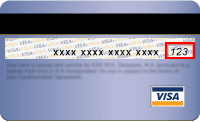
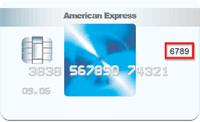
A Card Verification Code, or CVC, is a number that provides extra security to credit and debit card holders, in case an unauthorized person gets a hold of your account number. CVCs are one way to make sure someone has the actual card in his or her possession.
The CVC on American Express cards is four digits, and is located on the front of the card, on the right side. Discover, MasterCard, and Visa use three-digit CVCs, which are listed on the back of the card. The CVC is the last three digits of the number that appears on your signature bar.
You can transfer an order to another person (account) if you are only making the purchase for them and do not intend to use the product yourself, for example:
- You are the purchase department but the license is to be used by the engineer department;
- You are a reseller that is placing an order for your client;
In order to transfer an order, please go to My Orders page, locate the order you wish to transfer, then click "Transfer" next to the order and follow the onscreen instructions.
Note you will not be able to transfer an order once you have accessed the license key information.
When you place an order, you will automatically receive a one year free subscription. This subscription allows you to receive license keys for any new build released within one year after your purchase date, even if the new build belongs to a newer major version.
After the first year, if you still wish to receive license keys for newer builds, then you must renew your subscription by submitting a subscription order. To renew your subscription or view information about your existing subscription orders, simply click the "Renew Subscription" button for the original order.
Note that you need to renew your subscription only if you wish to receive newer builds/versions. The license keys that you have already received under your past subscription will continue to function for their respective builds even after your subscription expires. As such it is not necessary to renew your subscription if you only intend to continue using your old versions.
The basic principle for upgrading is the older your previous order is, the more expensive it is to upgrade. Since renewing subscription to current effectively upgrade your license to the current version, it follows the same principle. This means the more time has elapsed after your previous subscription has expired, the more expensive it is to renew.
This is reflected during renewing where the price is calculated based on the number of years have relapsed after your last subscription has expired. Since it is based on when your last subscription has expired (or if you do not have any subscription order, based on when your free subscription has expired), you will not lose any time if you choose to renew earlier. Whatever time period will just be added to your previous expiration date. For example, if your current subscription expires on May 1st, 2016 and you decide to renew on April 1st, 2016 for one more year, your new expiration date will be May 1st, 2017, not April 1st, 2017 since the time is based on your last expiration date. Because the price is calculated based on your last subscription expiration date, it will not save any money by skipping years.
Please follow these steps to download invoice for an order that you have placed:
- Go to My Orders page and locate the order;
- Click "Invoices" button under the order;
This will list all invoice(s) associated to this order, which can include invoice for the original order as well as subsequent subscription renew orders.
